
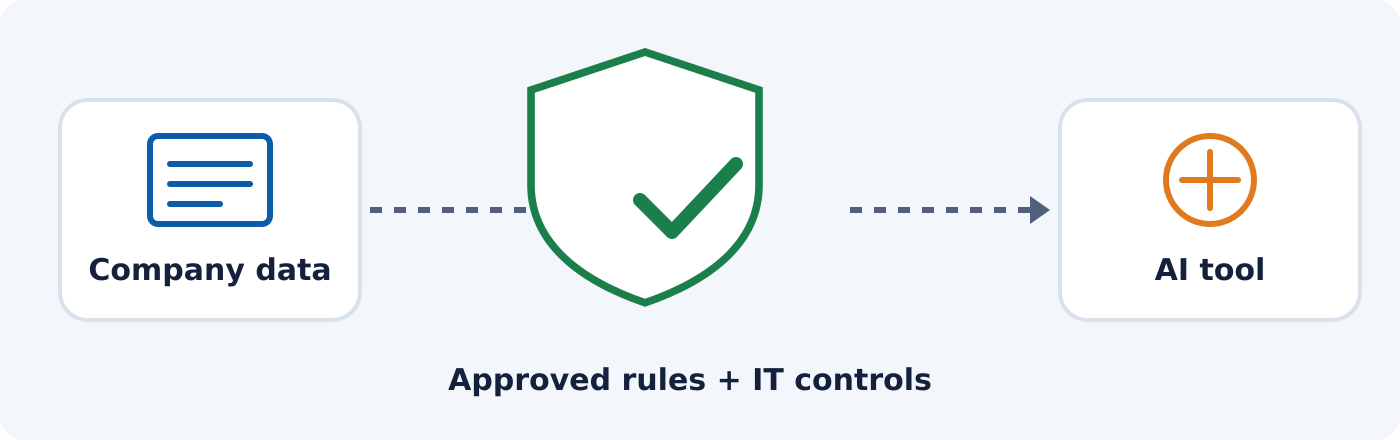
AI security for business starts with everyday decisions. An employee uploads a customer spreadsheet to save an hour of work. A manager pastes an internal proposal into a chatbot to improve the wording. Someone connects an AI assistant to a shared drive.
Each task starts with a reasonable goal: get work done faster. But has anyone checked what information the tool receives, who can access it, or what it is allowed to do?
For business owners, AI adoption brings a management question alongside the technology question: how do we make work easier while keeping control of our information?
Table of Contents
Where can AI help with everyday business tasks?
Start with a task your team can describe and measure. “Use more AI” is hard to evaluate. “Reduce the time needed to prepare a first draft of a product FAQ” gives you something concrete to test.
| Business task | Controlled pilot example | What to measure |
|---|---|---|
| Marketing | Draft FAQs from published product information | Editing time, factual corrections |
| Sales | Build a follow-up template using fictional customer details | Time to a usable draft |
| Operations | Turn a public instruction manual into a draft checklist | Accuracy, review effort |
| Staff training | Create practice scenarios from invented situations | Usefulness, supervisor feedback |
These are illustrative pilots, not guarantees of productivity or security. Results depend on the tool, the information supplied, and the review process.
Count the time spent checking the result. If a draft saves twenty minutes but needs thirty minutes of corrections, the workflow needs another look.
AI security for business: how are AI, IT, and cybersecurity connected?
AI is part of your technology environment. It uses accounts, processes information, depends on vendors, and may connect to applications your business already relies on.
- IT manages those connections.
- Cybersecurity addresses the chance that information or systems could be accessed, exposed, altered, or disrupted.
- Business leadership decides which uses are worthwhile and who is accountable.
NIST’s Cybersecurity, Privacy, and AI program frames the same relationship: managing AI-related cybersecurity and privacy risks, and adapting security practices as AI changes the threat landscape. So an AI subscription should prompt more than a purchasing decision. It should start a conversation about data, access, ownership, and oversight.
What AI cybersecurity risks should business owners understand?
| Risk | What can happen | Question to ask |
|---|---|---|
| Data leaving approved processes | Pasted or uploaded files may be handled under terms nobody reviewed. | Would we send this to a new outside vendor without review? |
| Too much access | A drafting assistant may ask for email, shared files, or customer records. | One approved folder, or the whole drive? |
| Wrong or manipulated answers | Responses can be invented, or steered by malicious text hidden in material the tool reads. | Who checks prices, promises, and facts? |
| Familiar-sounding fraud | AI can power convincing impersonation messages and cloned voices. | Is there a callback step for payment changes? |
1. Company information can leave approved processes
Pause before uploading any document you would not normally send to a new vendor without reviewing the arrangement. Provider practices vary, and whether submitted information can be used for model training may depend on the subscription and configuration. Review the actual terms and settings for the service your employees will use. The Australian Cyber Security Centre’s AI guidance for small business recommends checking vendor data practices and setting clear rules for what staff may upload.
2. Connected tools can receive more access than a task requires
Treat each permission as its own decision. Ask whether the assistant needs to suggest a change or execute it. For AI agents that take actions, keep consequential steps, such as sending customer messages or modifying records, under human review. The Australian small business cyber security handbook advises limiting agent permissions and keeping control of significant actions.
3. A convincing answer can still be wrong or manipulated
AI responses can contain invented information. AI systems can also follow malicious instructions hidden in the material they process, a risk called prompt injection, which the UK National Cyber Security Centre highlights as an AI-specific concern. A polished customer reply still needs someone to check its pricing, commitments, and supporting facts. Treat outside material as information to evaluate, never as authority to change a business process.
4. Fraud can look and sound familiar
A familiar writing style or voice should never be enough to authorize a sensitive action. Use an established verification process for unexpected payment requests or account changes, and confirm important actions through a trusted channel. The same handbook recommends this.
What should an employee AI use policy include?
Employees need guidance they can apply during a busy workday. A practical starting policy answers five questions:
- Which tools and accounts are approved? Name the products, permitted uses, and a responsible owner.
- What information is restricted? Give recognizable examples: credentials, customer records, payroll, internal pricing, confidential agreements.
- Who approves exceptions and integrations? Provide a contact before anyone uploads restricted data or connects an app.
- What requires review? Identify outputs and actions that need human approval.
- How do we report a mistake? Give staff a clear route for an accidental upload or unexpected tool behavior.
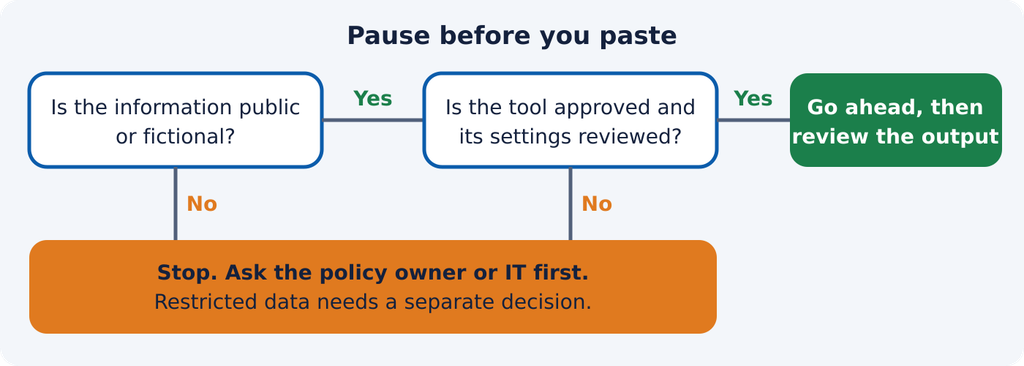
Take a sales employee who wants help rewriting a proposal. A permitted path might be an approved tool with fictional names and sample figures. Uploading the real agreement would need a separate decision under company policy. Make the permitted path convenient enough that people follow it.
What should IT review before you expand AI use?
Bring IT in while the workflow is still easy to change. Six review questions:
- Which tools are in use, and who owns each subscription?
- What data enters the service, where is it retained, and how can it be removed?
- Which users, folders, and applications can it access?
- How are accounts secured, and how is access removed when someone leaves?
- What happens if the service gives a wrong result or becomes unavailable?
- Who responds if information is shared incorrectly?
An AI purchase also belongs in your IT budget planning. Include licenses, administration, training, review time, and ongoing support when you weigh the investment.
What is a practical first step? Run one controlled AI pilot
Choose one workflow, one owner, and one approved tool, using public or synthetic information at first. Before you start, record how long the task takes today and the quality standard the result must meet. Decide who reviews outputs and which actions stay manual.
At the end, ask:
- Did the team save time after review and corrections?
- Did the output meet the quality standard?
- Did the task need data or access beyond its approved scope?
- Is the benefit big enough to justify continued spending and oversight?
Use the answers to improve, expand, or stop. A successful pilot gives you evidence for the next decision.
How ESEI fits into the conversation
AI decisions depend on the IT environment around them. ESEI’s IT Performance Management plans cover help desk support, patch management, network and server monitoring, endpoint detection and response, cloud file backup, vendor management, and a security operations center. Those capabilities are part of the foundation your business relies on as it evaluates new tools. ESEI is headquartered in El Paso, with clients across Texas, including San Antonio, Austin, and Dallas. For specific needs such as cyber compliance support, vulnerability scans, or Microsoft 365 backup, see ESEI’s IT Specialized Services.
Not sure what your team is already sharing with AI?
Bring that question to your next IT conversation. We’ll talk through your current environment and the IT priorities behind a more controlled approach to AI.
Frequently asked questions
Is it safe to upload company documents to AI tools?
It depends on the document, your company policy, the provider’s terms, and the tool’s configuration. Use only approved workflows, and get authorization before uploading restricted information.
Does a paid AI subscription automatically protect business data?
No. Price alone doesn’t settle suitability. Review the specific plan’s data handling, retention, access controls, and contract terms against your needs.
What is shadow AI?
Shadow AI is the use of AI tools for work outside an organization’s approved or managed processes. A tool inventory and a clear approval path bring that activity into view.
Can AI replace IT support or cybersecurity management?
AI can assist with individual tasks, but your business still needs accountable people to manage access, evaluate risks, verify decisions, and respond when something goes wrong.
Where should a business start with AI adoption?
Pick one measurable task using public or synthetic information, approve the tool and its boundaries, and review the results before adding sensitive data or broader access.
Sources: NIST Cybersecurity, Privacy, and AI program; UK National Cyber Security Centre, “AI and cyber security: what you need to know”; Australian Cyber Security Centre, AI guidance for small business and small business cyber security handbook.